WebGL2 通用GPU计算(GPGPU)
GPGPU即"通用图形处理器计算"(“General Purpose” GPU),指将GPU用于像素渲染之外的其他计算目的。
理解WebGL中GPGPU的核心在于:纹理(texture)本质上是二维数值数组,而非图像。在纹理详解中我们探讨了纹理读取,在渲染到纹理中介绍了纹理写入。 因此,通过纹理我们实现了对二维数组的读写操作。 同理,缓冲区(buffer)不仅可存储位置、法线、纹理坐标和颜色数据,还能承载速度、质量、股价等任意数据。 创造性地运用这些特性进行数学计算,正是WebGL中GPGPU的精髓。
首先通过纹理实现方案:
JavaScript中的Array.prototype.map函数可对数组元素执行遍历处理。
function multBy2(v) {
  return v * 2;
}

const src = [1, 2, 3, 4, 5, 6];
const dst = src.map(multBy2);

// dst is now [2, 4, 6, 8, 10, 12];
可将multBy2视为着色器,而map则类似于调用gl.drawArrays或gl.drawElements,但存在以下差异。
着色器不会生成新数组,必须预先提供目标数组。
我们可以通过自定义map函数来模拟此行为:
function multBy2(v) {
  return v * 2;
}

+function mapSrcToDst(src, fn, dst) {
+  for (let i = 0; i < src.length; ++i) {
+    dst[i] = fn(src[i]);
+  }
+}

const src = [1, 2, 3, 4, 5, 6];
-const dst = src.map(multBy2);
+const dst = new Array(6);    // to simulate that in WebGL we have to allocate a texture
+mapSrcToDst(src, multBy2, dst);

// dst is now [2, 4, 6, 8, 10, 12];
着色器不返回值,而是设置out变量。
这一行为很容易模拟实现。
+let outColor;

function multBy2(v) {
-  return v * 2;
+  outColor = v * 2;
}

function mapSrcToDst(src, fn, dst) {
  for (let i = 0; i < src.length; ++i) {
-    dst[i] = fn(src[i]);
+    fn(src[i]);
+    dst[i] = outColor;
  }
}

const src = [1, 2, 3, 4, 5, 6];
const dst = new Array(6);    // to simulate that in WebGL we have to allocate a texture
mapSrcToDst(src, multBy2, dst);

// dst is now [2, 4, 6, 8, 10, 12];
着色器采用基于目标(destination-based)而非基于源(source-based)的处理模式。
换言之,着色器会遍历目标位置并自问"此处应填入何值"。
let outColor;

function multBy2(src) {
-  outColor = v * 2;
+  return function(i) {
+    outColor = src[i] * 2;
+  }
}

-function mapSrcToDst(src, fn, dst) {
-  for (let i = 0; i < src.length; ++i) {
-    fn(src[i]);
+function mapDst(dst, fn) {
+  for (let i = 0; i < dst.length; ++i) {
+    fn(i);
    dst[i] = outColor;
  }
}

const src = [1, 2, 3, 4, 5, 6];
const dst = new Array(6);    // to simulate that in WebGL we have to allocate a texture
mapDst(dst, multBy2(src));

// dst is now [2, 4, 6, 8, 10, 12];
在WebGL中,需要提供值的像素索引/ID被称为gl_FragCoord。
let outColor;
+let gl_FragCoord;

function multBy2(src) {
-  return function(i) {
-    outColor = src[i] * 2;
+  return function() {
+    outColor = src[gl_FragCoord] * 2;
  }
}

function mapDst(dst, fn) {
  for (let i = 0; i < dst.length; ++i) {
-    fn(i);
+    gl_FragCoord = i;
+    fn();
    dst[i] = outColor;
  }
}

const src = [1, 2, 3, 4, 5, 6];
const dst = new Array(6);    // to simulate that in WebGL we have to allocate a texture
mapDst(dst, multBy2(src));

// dst is now [2, 4, 6, 8, 10, 12];
在WebGL中,纹理(textures)本质上是二维数组。
假设我们的dst数组表示一个3x2纹理。
let outColor;
let gl_FragCoord;

function multBy2(src, across) {
  return function() {
-    outColor = src[gl_FragCoord] * 2;
+    outColor = src[gl_FragCoord.y * across + gl_FragCoord.x] * 2;
  }
}

-function mapDst(dst, fn) {
-  for (let i = 0; i < dst.length; ++i) {
-    gl_FragCoord = i;
-    fn();
-    dst[i] = outColor;
-  }
-}
function mapDst(dst, across, up, fn) {
  for (let y = 0; y < up; ++y) {
    for (let x = 0; x < across; ++x) {
      gl_FragCoord = {x, y};
      fn();
      dst[y * across + x] = outColor;
    }
  }
}

const src = [1, 2, 3, 4, 5, 6];
const dst = new Array(6);    // to simulate that in WebGL we have to allocate a texture
mapDst(dst, 3, 2, multBy2(src, 3));

// dst is now [2, 4, 6, 8, 10, 12];
我们可以继续扩展。希望上述示例能帮助您理解:WebGL中的GPGPU在概念上其实相当简单。现在让我们实际用WebGL实现上述功能。
要理解后续代码实现,需预先掌握以下核心知识:
const vs = `#version 300 es
in vec4 position;
void main() {
  gl_Position = position;
}
`;

const fs = `#version 300 es
precision highp float;

uniform sampler2D srcTex;

out vec4 outColor;

void main() {
  ivec2 texelCoord = ivec2(gl_FragCoord.xy);
  vec4 value = texelFetch(srcTex, texelCoord, 0);  // 0 = mip level 0
  outColor = value * 2.0;
}
`;

const dstWidth = 3;
const dstHeight = 2;

// make a 3x2 canvas for 6 results
const canvas = document.createElement('canvas');
canvas.width = dstWidth;
canvas.height = dstHeight;

const gl = canvas.getContext('webgl2');

const program = webglUtils.createProgramFromSources(gl, [vs, fs]);
const positionLoc = gl.getAttribLocation(program, 'position');
const srcTexLoc = gl.getUniformLocation(program, 'srcTex');

// setup a full canvas clip space quad
const buffer = gl.createBuffer();
gl.bindBuffer(gl.ARRAY_BUFFER, buffer);
gl.bufferData(gl.ARRAY_BUFFER, new Float32Array([
  -1, -1,
   1, -1,
  -1,  1,
  -1,  1,
   1, -1,
   1,  1,
]), gl.STATIC_DRAW);

// Create a vertex array object (attribute state)
const vao = gl.createVertexArray();
gl.bindVertexArray(vao);

// setup our attributes to tell WebGL how to pull
// the data from the buffer above to the position attribute
gl.enableVertexAttribArray(positionLoc);
gl.vertexAttribPointer(
    positionLoc,
    2,         // size (num components)
    gl.FLOAT,  // type of data in buffer
    false,     // normalize
    0,         // stride (0 = auto)
    0,         // offset
);

// create our source texture
const srcWidth = 3;
const srcHeight = 2;
const tex = gl.createTexture();
gl.bindTexture(gl.TEXTURE_2D, tex);
gl.pixelStorei(gl.UNPACK_ALIGNMENT, 1); // see https://webglfundamentals.org/webgl/lessons/webgl-data-textures.html
gl.texImage2D(
    gl.TEXTURE_2D,
    0,                // mip level
    gl.R8,            // internal format
    srcWidth,
    srcHeight,
    0,                // border
    gl.RED,           // format
    gl.UNSIGNED_BYTE, // type
    new Uint8Array([
      1, 2, 3,
      4, 5, 6,
    ]));
gl.texParameteri(gl.TEXTURE_2D, gl.TEXTURE_MIN_FILTER, gl.NEAREST);
gl.texParameteri(gl.TEXTURE_2D, gl.TEXTURE_MAG_FILTER, gl.NEAREST);
gl.texParameteri(gl.TEXTURE_2D, gl.TEXTURE_WRAP_S, gl.CLAMP_TO_EDGE);
gl.texParameteri(gl.TEXTURE_2D, gl.TEXTURE_WRAP_T, gl.CLAMP_TO_EDGE);

gl.useProgram(program);
gl.uniform1i(srcTexLoc, 0);  // tell the shader the src texture is on texture unit 0

gl.drawArrays(gl.TRIANGLES, 0, 6);  // draw 2 triangles (6 vertices)

// get the result
const results = new Uint8Array(dstWidth * dstHeight * 4);
gl.readPixels(0, 0, dstWidth, dstHeight, gl.RGBA, gl.UNSIGNED_BYTE, results);

// print the results
for (let i = 0; i < dstWidth * dstHeight; ++i) {
  log(results[i * 4]);
}
以下是实际运行效果:
关于上述代码的要点说明:
-
我们绘制了一个裁剪空间范围为-1到+1的四边形。
我们通过两个三角形创建了一个-1到+1范围的四边形。这意味着,在正确设置视口的情况下,我们将绘制目标的所有像素。换句话说,我们将要求着色器为结果数组中的每个元素生成一个值——在本例中,该数组就是画布本身。
-
texelFetch是用于从纹理中获取单个纹素(texel)的纹理查询函数。该函数接收三个参数:采样器(sampler)、基于整数的纹素坐标(texel coordinate)和mip层级。
gl_FragCoord是vec2类型,需转换为ivec2才能用于texelFetch。 只要源纹理和目标纹理尺寸相同(本例满足此条件),就无需额外数学计算。 -
着色器每个像素写入4个值
在此特定情况下,这将影响我们读取输出的方式。由于其他格式/类型组合不受支持,我们通过
RGBA/UNSIGNED_BYTE格式调用readPixels,因此需要每间隔4个值提取有效结果。注意:利用WebGL每次处理4个值的特性可进一步提升性能。
-
我们使用
R8作为纹理的内部格式。这意味着纹理中仅红色通道包含我们的有效数据值。
-
输入数据和输出数据(画布)均采用UNSIGNED_BYTE格式
这表明我们仅能传入和获取0到255之间的整数值。通过使用不同格式的纹理作为输入,我们可以扩展输入数据的范围;同样,尝试渲染到不同格式的纹理也能获得更大范围的输出值。
在上例中,src和dst尺寸相同。现修改为:每2个src值相加生成1个dst值。即给定输入[1, 2, 3, 4, 5, 6],输出应为[3, 7, 11],同时保持源数据为3x2结构。
从二维数组中获取值的基本公式就像从一维数组中获取值一样
y = floor(indexInto1DArray / widthOf2DArray);
x = indexInto1DArray % widthOf2Array;
基于此,我们的片段着色器需修改为以下形式以实现每2个值相加:
#version 300 es
precision highp float;

uniform sampler2D srcTex;
uniform ivec2 dstDimensions;

out vec4 outColor;

vec4 getValueFrom2DTextureAs1DArray(sampler2D tex, ivec2 dimensions, int index) {
  int y = index / dimensions.x;
  int x = index % dimensions.x;
  return texelFetch(tex, ivec2(x, y), 0);
}

void main() {
  // compute a 1D index into dst
  ivec2 dstPixel = ivec2(gl_FragCoord.xy);
  int dstIndex = dstPixel.y * dstDimensions.x + dstPixel.x;

  ivec2 srcDimensions = textureSize(srcTex, 0);  // size of mip 0

  vec4 v1 = getValueFrom2DTextureAs1DArray(srcTex, srcDimensions, dstIndex * 2);
  vec4 v2 = getValueFrom2DTextureAs1DArray(srcTex, srcDimensions, dstIndex * 2 + 1);

  outColor = v1 + v2;
}
getValueFrom2DTextureAs1DArray函数本质上是我们模拟一维数组访问的核心方法,其关键实现体现在以下两行代码:
  vec4 v1 = getValueFrom2DTextureAs1DArray(srcTex, srcDimensions, dstIndex * 2.0);
  vec4 v2 = getValueFrom2DTextureAs1DArray(srcTex, srcDimensions, dstIndex * 2.0 + 1.0);
其等效于以下逻辑:
  vec4 v1 = srcTexAs1DArray[dstIndex * 2.0];
  vec4 v2 = setTexAs1DArray[dstIndex * 2.0 + 1.0];
在JavaScript中,我们需要获取dstDimensions的位置。
const program = webglUtils.createProgramFromSources(gl, [vs, fs]);
const positionLoc = gl.getAttribLocation(program, 'position');
const srcTexLoc = gl.getUniformLocation(program, 'srcTex');
+const dstDimensionsLoc = gl.getUniformLocation(program, 'dstDimensions');
并设置它
gl.useProgram(program);
gl.uniform1i(srcTexLoc, 0);  // tell the shader the src texture is on texture unit 0
+gl.uniform2f(dstDimensionsLoc, dstWidth, dstHeight);
且需要调整目标(画布)的尺寸。
const dstWidth = 3;
-const dstHeight = 2;
+const dstHeight = 1;
至此,我们已实现结果数组可对源数组进行随机访问计算。
如需使用更多输入数组,只需添加纹理,在同一纹理中存储更多数据即可。
现在让我们通过变换反馈 transform feedback实现:
“变换反馈”(Transform Feedback)是指将顶点着色器中变量的输出写入一个或多个缓冲区的功能。
使用变换反馈的优势在于输出是一维的,所以推理起来可能更容易。它甚至更接近 JavaScript 中的map。
让我们输入两个数组,并输出它们的和、差和乘积。顶点着色器代码如下:
#version 300 es

in float a;
in float b;

out float sum;
out float difference;
out float product;

void main() {
  sum = a + b;
  difference = a - b;
  product = a * b;
}
而片段着色器仅需满足编译要求。
#version 300 es
precision highp float;
void main() {
}
要使用变换反馈,我们必须告诉 WebGL 需要写入哪些变量以及写入顺序。
我们在链接着色器程序之前调用 gl.transformFeedbackVaryings 来实现这一点。
为了明确说明我们需要做什么,这次我们不打算使用辅助函数来编译着色器并链接程序。
以下是编译着色器的代码,其实现类似于基础教程中的原始版本。
function createShader(gl, type, src) {
  const shader = gl.createShader(type);
  gl.shaderSource(shader, src);
  gl.compileShader(shader);
  if (!gl.getShaderParameter(shader, gl.COMPILE_STATUS)) {
    throw new Error(gl.getShaderInfoLog(shader));
  }
  return shader;
}
我们将使用该函数编译两个着色器,在程序链接前执行附着操作并调用gl.transformFeedbackVaryings。
const vShader = createShader(gl, gl.VERTEX_SHADER, vs);
const fShader = createShader(gl, gl.FRAGMENT_SHADER, fs);

const program = gl.createProgram();
gl.attachShader(program, vShader);
gl.attachShader(program, fShader);
gl.transformFeedbackVaryings(
    program,
    ['sum', 'difference', 'product'],
    gl.SEPARATE_ATTRIBS,
);
gl.linkProgram(program);
if (!gl.getProgramParameter(program, gl.LINK_STATUS)) {
  throw new Error(gl.getProgramInfoLog(program));
}
gl.transformFeedbackVaryings 接受 3 个参数。程序program,一个数组,其中包含我们想要写入的变量的名称,这些变量的名称按照您希望的顺序排列。
如果您确实有一个实际执行了某些操作的片段着色器,那么某些变量可能仅适用于该片段着色器,因此无需写入。
在本例中,我们将写入所有变量,因此我们将传入所有 3 个变量的名称。
最后一个参数可以是两个值之一:SEPARATE_ATTRIBS 或 INTERLEAVED_ATTRIBS。
SEPARATE_ATTRIBS 表示每个varying变量将写入独立的缓冲区。
INTERLEAVED_ATTRIBS 表示所有varying变量将按指定顺序交错写入同一缓冲区。
在本例中,由于我们指定了['sum', 'difference', 'product']的顺序,若使用INTERLEAVED_ATTRIBS模式,输出数据将以sum0, difference0, product0, sum1, difference1, product1, sum2, difference2, product2,...的形式交错存储在单个缓冲区中。
我们当前使用的是SEPARATE_ATTRIBS模式,因此每个输出将写入独立的缓冲区。
与其他示例类似,我们需要为输入属性配置缓冲区。
const aLoc = gl.getAttribLocation(program, 'a');
const bLoc = gl.getAttribLocation(program, 'b');

// Create a vertex array object (attribute state)
const vao = gl.createVertexArray();
gl.bindVertexArray(vao);

function makeBuffer(gl, sizeOrData) {
  const buf = gl.createBuffer();
  gl.bindBuffer(gl.ARRAY_BUFFER, buf);
  gl.bufferData(gl.ARRAY_BUFFER, sizeOrData, gl.STATIC_DRAW);
  return buf;
}

function makeBufferAndSetAttribute(gl, data, loc) {
  const buf = makeBuffer(gl, data);
  // setup our attributes to tell WebGL how to pull
  // the data from the buffer above to the attribute
  gl.enableVertexAttribArray(loc);
  gl.vertexAttribPointer(
      loc,
      1,         // size (num components)
      gl.FLOAT,  // type of data in buffer
      false,     // normalize
      0,         // stride (0 = auto)
      0,         // offset
  );
}

const a = [1, 2, 3, 4, 5, 6];
const b = [3, 6, 9, 12, 15, 18];

// put data in buffers
const aBuffer = makeBufferAndSetAttribute(gl, new Float32Array(a), aLoc);
const bBuffer = makeBufferAndSetAttribute(gl, new Float32Array(b), bLoc);
我们需要设置"变换反馈"(transform feedback)对象。 该对象包含待写入缓冲区的状态配置,正如顶点数组管理所有输入属性的状态,"变换反馈"则管理所有输出属性的状态。
以下设置我们所需的代码:
// Create and fill out a transform feedback
const tf = gl.createTransformFeedback();
gl.bindTransformFeedback(gl.TRANSFORM_FEEDBACK, tf);

// make buffers for output
const sumBuffer = makeBuffer(gl, a.length * 4);
const differenceBuffer = makeBuffer(gl, a.length * 4);
const productBuffer = makeBuffer(gl, a.length * 4);

// bind the buffers to the transform feedback
gl.bindBufferBase(gl.TRANSFORM_FEEDBACK_BUFFER, 0, sumBuffer);
gl.bindBufferBase(gl.TRANSFORM_FEEDBACK_BUFFER, 1, differenceBuffer);
gl.bindBufferBase(gl.TRANSFORM_FEEDBACK_BUFFER, 2, productBuffer);

gl.bindTransformFeedback(gl.TRANSFORM_FEEDBACK, null);

// buffer's we are writing to can not be bound else where
gl.bindBuffer(gl.ARRAY_BUFFER, null);  // productBuffer was still bound to ARRAY_BUFFER so unbind it
我们调用bindBufferBase来设置每个输出(输出0、输出1和输出2)将写入哪个缓冲区。
输出0、1、2对应我们在链接程序时传递给gl.transformFeedbackVaryings的名称。
当我们完成"变换反馈"(transform feedback)操作后,所创建的状态如下所示:
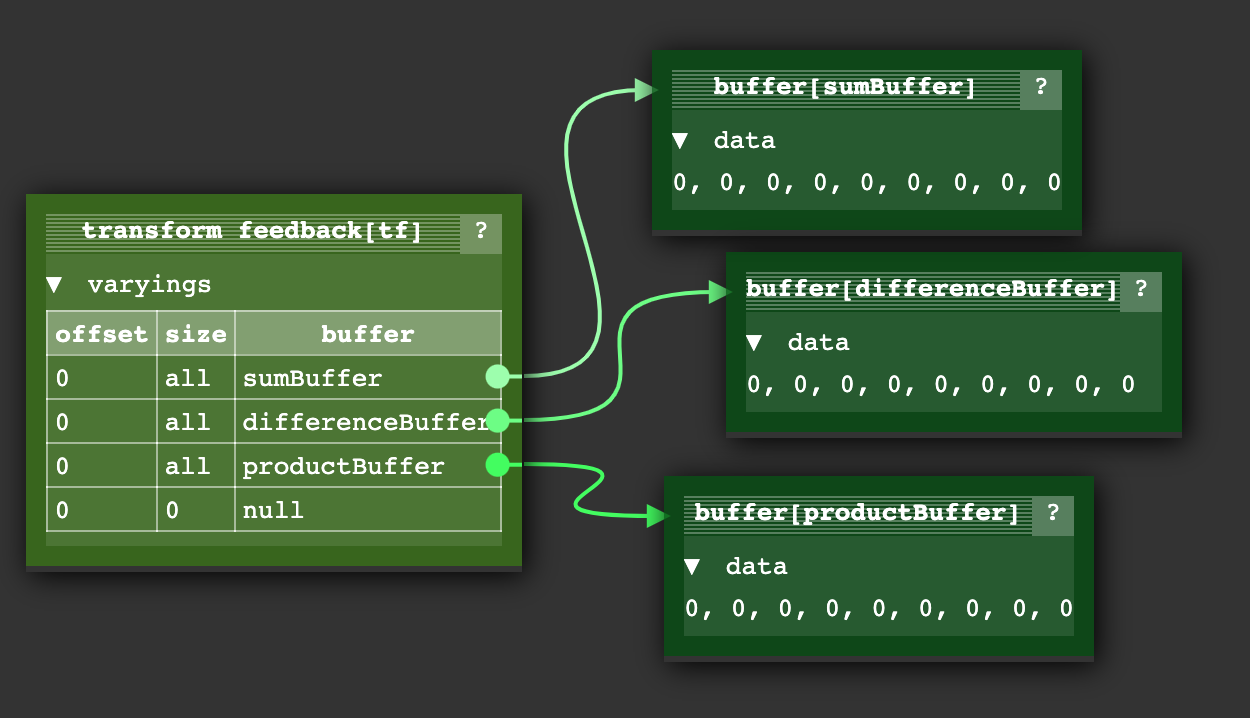
另外还有一个bindBufferRange函数,允许我们指定缓冲区内的写入子范围,但此处我们不会使用该功能。
要执行着色器,我们需要执行以下操作:
gl.useProgram(program);

// bind our input attribute state for the a and b buffers
gl.bindVertexArray(vao);

// no need to call the fragment shader
gl.enable(gl.RASTERIZER_DISCARD);

gl.bindTransformFeedback(gl.TRANSFORM_FEEDBACK, tf);
gl.beginTransformFeedback(gl.POINTS);
gl.drawArrays(gl.POINTS, 0, a.length);
gl.endTransformFeedback();
gl.bindTransformFeedback(gl.TRANSFORM_FEEDBACK, null);

// turn on using fragment shaders again
gl.disable(gl.RASTERIZER_DISCARD);
我们禁用片段着色器的调用,绑定之前创建的变换反馈(transform feedback)对象,启用变换反馈,然后调用绘制(draw)操作。
要查看这些值,我们可以调用 gl.getBufferSubData 方法。
log(`a: ${a}`);
log(`b: ${b}`);

printResults(gl, sumBuffer, 'sums');
printResults(gl, differenceBuffer, 'differences');
printResults(gl, productBuffer, 'products');

function printResults(gl, buffer, label) {
  const results = new Float32Array(a.length);
  gl.bindBuffer(gl.ARRAY_BUFFER, buffer);
  gl.getBufferSubData(
      gl.ARRAY_BUFFER,
      0,    // byte offset into GPU buffer,
      results,
  );
  // print the results
  log(`${label}: ${results}`);
}
可以看到它生效了。GPU 成功计算出了我们传入的 ‘a’ 和 ‘b’ 值的和(sum)、差(difference)以及积(product)。
注:您可能会发现这个变换反馈状态图示例 有助于理解"变换反馈"(transform feedback)的概念。 不过该示例与上文不同,其顶点着色器配合变换反馈生成的是圆形点阵的位置和颜色数据。
第一个示例:粒子系统
假设我们有一个非常简单的粒子系统。每个粒子仅包含位置(position)和速度(velocity)属性,当粒子移出屏幕一侧边界时,会从另一侧重新出现。
根据本站大多数其他文章的惯例,你可能会选择在JavaScript中更新粒子的位置。
for (const particle of particles) {
  particle.pos.x = (particle.pos.x + particle.velocity.x) % canvas.width;
  particle.pos.y = (particle.pos.y + particle.velocity.y) % canvas.height;
}
然后逐个绘制这些粒子
useProgram (particleShader)
setup particle attributes
for each particle
  set uniforms
  draw particle
或者,您也可以一次性上传所有粒子的新位置数据
bindBuffer(..., particlePositionBuffer)
bufferData(..., latestParticlePositions, ...)
useProgram (particleShader)
setup particle attributes
set uniforms
draw particles
利用前文的变换反馈(transform feedback)示例,我们可以:
- 创建包含每个粒子速度(velocity)的缓冲区(buffer)
- 建立两个位置(position)缓冲区
- 使用变换反馈将速度与一个位置缓冲区相加,结果写入另一个位置缓冲区
- 使用新位置数据进行绘制(draw)
在下一帧时:
- 从存储新位置的缓冲区读取(read)数据
- 回写(write back)到另一个缓冲区以生成更新的位置
以下是用于更新粒子位置的顶点着色器代码:
#version 300 es
in vec2 oldPosition;
in vec2 velocity;

uniform float deltaTime;
uniform vec2 canvasDimensions;

out vec2 newPosition;

vec2 euclideanModulo(vec2 n, vec2 m) {
	return mod(mod(n, m) + m, m);
}

void main() {
  newPosition = euclideanModulo(
      oldPosition + velocity * deltaTime,
      canvasDimensions);
}
使用一个简单的顶点着色器来绘制粒子
#version 300 es
in vec4 position;
uniform mat4 matrix;

void main() {
  // do the common matrix math
  gl_Position = matrix * position;
  gl_PointSize = 10.0;
}
以下是将程序创建和链接过程封装为通用函数的实现,可同时适用于常规渲染和Transform Feedback着色器。
function createProgram(gl, shaderSources, transformFeedbackVaryings) {
  const program = gl.createProgram();
  [gl.VERTEX_SHADER, gl.FRAGMENT_SHADER].forEach((type, ndx) => {
    const shader = createShader(gl, type, shaderSources[ndx]);
    gl.attachShader(program, shader);
  });
  if (transformFeedbackVaryings) {
    gl.transformFeedbackVaryings(
        program,
        transformFeedbackVaryings,
        gl.SEPARATE_ATTRIBS,
    );
  }
  gl.linkProgram(program);
  if (!gl.getProgramParameter(program, gl.LINK_STATUS)) {
    throw new Error(gl.getProgramInfoLog(program));
  }
  return program;
}
随后利用该函数编译着色器:其中一个包含transform feedback输出变量。
const updatePositionProgram = createProgram(
    gl, [updatePositionVS, updatePositionFS], ['newPosition']);
const drawParticlesProgram = createProgram(
    gl, [drawParticlesVS, drawParticlesFS]);
照例,我们需要查找到各个变量的位置:
const updatePositionPrgLocs = {
  oldPosition: gl.getAttribLocation(updatePositionProgram, 'oldPosition'),
  velocity: gl.getAttribLocation(updatePositionProgram, 'velocity'),
  canvasDimensions: gl.getUniformLocation(updatePositionProgram, 'canvasDimensions'),
  deltaTime: gl.getUniformLocation(updatePositionProgram, 'deltaTime'),
};

const drawParticlesProgLocs = {
  position: gl.getAttribLocation(drawParticlesProgram, 'position'),
  matrix: gl.getUniformLocation(drawParticlesProgram, 'matrix'),
};
现在让我们生成一些随机的位置和速度数据:
// create random positions and velocities.
const rand = (min, max) => {
  if (max === undefined) {
    max = min;
    min = 0;
  }
  return Math.random() * (max - min) + min;
};
const numParticles = 200;
const createPoints = (num, ranges) =>
   new Array(num).fill(0).map(_ => ranges.map(range => rand(...range))).flat();
const positions = new Float32Array(createPoints(numParticles, [[canvas.width], [canvas.height]]));
const velocities = new Float32Array(createPoints(numParticles, [[-300, 300], [-300, 300]]));
随后我们将这些数据存入缓冲区:
function makeBuffer(gl, sizeOrData, usage) {
  const buf = gl.createBuffer();
  gl.bindBuffer(gl.ARRAY_BUFFER, buf);
  gl.bufferData(gl.ARRAY_BUFFER, sizeOrData, usage);
  return buf;
}

const position1Buffer = makeBuffer(gl, positions, gl.DYNAMIC_DRAW);
const position2Buffer = makeBuffer(gl, positions, gl.DYNAMIC_DRAW);
const velocityBuffer = makeBuffer(gl, velocities, gl.STATIC_DRAW);
请注意,我们在为两个位置缓冲区调用gl.bufferData时传入了gl.DYNAMIC_DRAW参数,因为需要频繁更新这些缓冲区。
这只是提供给WebGL的优化提示,实际是否影响性能取决于WebGL的具体实现。
我们需要4个顶点数组。
- 第1个:在更新位置时使用
position1Buffer和velocity缓冲区 - 第2个:在更新位置时使用
position2Buffer和velocity缓冲区 - 第3个:在绘制时使用
position1Buffer - 第4个:在绘制时使用
position2Buffer
function makeVertexArray(gl, bufLocPairs) {
  const va = gl.createVertexArray();
  gl.bindVertexArray(va);
  for (const [buffer, loc] of bufLocPairs) {
    gl.bindBuffer(gl.ARRAY_BUFFER, buffer);
    gl.enableVertexAttribArray(loc);
    gl.vertexAttribPointer(
        loc,      // attribute location
        2,        // number of elements
        gl.FLOAT, // type of data
        false,    // normalize
        0,        // stride (0 = auto)
        0,        // offset
    );
  }
  return va;
}

const updatePositionVA1 = makeVertexArray(gl, [
  [position1Buffer, updatePositionPrgLocs.oldPosition],
  [velocityBuffer, updatePositionPrgLocs.velocity],
]);
const updatePositionVA2 = makeVertexArray(gl, [
  [position2Buffer, updatePositionPrgLocs.oldPosition],
  [velocityBuffer, updatePositionPrgLocs.velocity],
]);

const drawVA1 = makeVertexArray(
    gl, [[position1Buffer, drawParticlesProgLocs.position]]);
const drawVA2 = makeVertexArray(
    gl, [[position2Buffer, drawParticlesProgLocs.position]]);
接下来我们创建两个变换反馈(transform feedback)对象:
- 一个用来写入
position1Buffer - 一个用来写入
position2Buffer
function makeTransformFeedback(gl, buffer) {
  const tf = gl.createTransformFeedback();
  gl.bindTransformFeedback(gl.TRANSFORM_FEEDBACK, tf);
  gl.bindBufferBase(gl.TRANSFORM_FEEDBACK_BUFFER, 0, buffer);
  return tf;
}

const tf1 = makeTransformFeedback(gl, position1Buffer);
const tf2 = makeTransformFeedback(gl, position2Buffer);
使用变换反馈(transform feedback)时,必须解除其他绑定点的缓冲区关联。
ARRAY_BUFFER 仍绑定着我们最后放入数据的缓冲区。
调用 gl.bindBufferBase 时会设置 TRANSFORM_FEEDBACK_BUFFER。
这里有些容易混淆:当使用TRANSFORM_FEEDBACK_BUFFER参数调用gl.bindBufferBase时,实际上会将缓冲区绑定到两个位置。
一个绑定到变换反馈对象内部的索引化绑定点;
另一个绑定到名为TRANSFORM_FEEDBACK_BUFFER的全局绑定点。
// unbind left over stuff
gl.bindBuffer(gl.ARRAY_BUFFER, null);
gl.bindBuffer(gl.TRANSFORM_FEEDBACK_BUFFER, null);
为便于交换更新和绘制缓冲区,我们将设置这两个对象。
let current = {
  updateVA: updatePositionVA1,  // read from position1
  tf: tf2,                      // write to position2
  drawVA: drawVA2,              // draw with position2
};
let next = {
  updateVA: updatePositionVA2,  // read from position2
  tf: tf1,                      // write to position1
  drawVA: drawVA1,              // draw with position1
};
接着我们将实现渲染循环:首先使用变换反馈(transform feedback)更新粒子位置。
let then = 0;
function render(time) {
  // convert to seconds
  time *= 0.001;
  // Subtract the previous time from the current time
  const deltaTime = time - then;
  // Remember the current time for the next frame.
  then = time;

  webglUtils.resizeCanvasToDisplaySize(gl.canvas);

  gl.clear(gl.COLOR_BUFFER_BIT);

  // compute the new positions
  gl.useProgram(updatePositionProgram);
  gl.bindVertexArray(current.updateVA);
  gl.uniform2f(updatePositionPrgLocs.canvasDimensions, gl.canvas.width, gl.canvas.height);
  gl.uniform1f(updatePositionPrgLocs.deltaTime, deltaTime);

  // turn of using the fragment shader
  gl.enable(gl.RASTERIZER_DISCARD);

  gl.bindTransformFeedback(gl.TRANSFORM_FEEDBACK, current.tf);
  gl.beginTransformFeedback(gl.POINTS);
  gl.drawArrays(gl.POINTS, 0, numParticles);
  gl.endTransformFeedback();
  gl.bindTransformFeedback(gl.TRANSFORM_FEEDBACK, null);

  // turn on using fragment shaders again
  gl.disable(gl.RASTERIZER_DISCARD);
然后绘制粒子。
  // now draw the particles.
  gl.useProgram(drawParticlesProgram);
  gl.bindVertexArray(current.drawVA);
  gl.viewport(0, 0, gl.canvas.width, gl.canvas.height);
  gl.uniformMatrix4fv(
      drawParticlesProgLocs.matrix,
      false,
      m4.orthographic(0, gl.canvas.width, 0, gl.canvas.height, -1, 1));
  gl.drawArrays(gl.POINTS, 0, numParticles);
最后交换 current 和 next 的指向,这样下一帧就能使用最新位置数据生成新的位置。
  // swap which buffer we will read from
  // and which one we will write to
  {
    const temp = current;
    current = next;
    next = temp;
  }

  requestAnimationFrame(render);
}
requestAnimationFrame(render);
至此,我们完成了一个基于GPU的简易粒子系统实现。
下一个示例:查找离点最近的线段
我不确定这是否是个好示例,但这是我目前编写的案例。 我认为这可能不是最佳示例,因为我怀疑存在比暴力检查每个线段与点之间距离更好的算法来查找离点最近的线段。 例如,各种空间分区算法(space partitioning algorithms)可能让你轻松排除95%的线段,从而获得更快的计算速度。 尽管如此,这个示例至少可能展示了某些GPGPU技术。
问题描述:现有500个点和1000条线段,需为每个点找出距离最近的一条线段。暴力计算方法的实现如下:
for each point
  minDistanceSoFar = MAX_VALUE
  for each line segment
    compute distance from point to line segment
    if distance is < minDistanceSoFar
       minDistanceSoFar = distance
       closestLine = line segment
对500个点各自检查1000条线段,总计需要50万次计算。 现代GPU拥有数百至数千个核心,若能在GPU上执行此计算,理论上可获得数百至数千倍的加速。
这次,虽然我们可以像处理粒子那样将点数据存入缓冲区,但却无法对线段数据采用相同方式。 缓冲区通过属性(attributes)提供数据,这意味着 这意味着我们无法按需随机访问任意数据值,这些值是在着色器外部控制下分配给属性的。
因此,我们需要将线段位置存入纹理(texture)——正如前文所述, 纹理本质上就是二维数组的另一种表述,不过我们仍可将其作为一维数组来处理(根据需要)。
以下是用于查找单个点最近线段的顶点着色器代码,它完全实现了前文所述的暴力计算算法:
  const closestLineVS = `#version 300 es
  in vec3 point;

  uniform sampler2D linesTex;
  uniform int numLineSegments;

  flat out int closestNdx;

  vec4 getAs1D(sampler2D tex, ivec2 dimensions, int index) {
    int y = index / dimensions.x;
    int x = index % dimensions.x;
    return texelFetch(tex, ivec2(x, y), 0);
  }

  // from https://stackoverflow.com/a/6853926/128511
  // a is the point, b,c is the line segment
  float distanceFromPointToLine(in vec3 a, in vec3 b, in vec3 c) {
    vec3 ba = a - b;
    vec3 bc = c - b;
    float d = dot(ba, bc);
    float len = length(bc);
    float param = 0.0;
    if (len != 0.0) {
      param = clamp(d / (len * len), 0.0, 1.0);
    }
    vec3 r = b + bc * param;
    return distance(a, r);
  }

  void main() {
    ivec2 linesTexDimensions = textureSize(linesTex, 0);

    // find the closest line segment
    float minDist = 10000000.0;
    int minIndex = -1;
    for (int i = 0; i < numLineSegments; ++i) {
      vec3 lineStart = getAs1D(linesTex, linesTexDimensions, i * 2).xyz;
      vec3 lineEnd = getAs1D(linesTex, linesTexDimensions, i * 2 + 1).xyz;
      float dist = distanceFromPointToLine(point, lineStart, lineEnd);
      if (dist < minDist) {
        minDist = dist;
        minIndex = i;
      }
    }

    closestNdx = minIndex;
  }
  `;
我将getValueFrom2DTextureAs1DArray重命名为getAs1D,仅是为了缩短部分代码行以提升可读性。
除此之外,这就是对我们上文所写暴力算法的直接实现。
point 表示当前检测点。linesTex 纹理按线段端点对存储数据:每对数据依次包含线段的起点坐标和终点坐标。
首先创建测试数据:这里使用2个点和5条线段。所有数据都补零(0, 0),因为每个元素都将存储在RGBA纹理中。
const points = [
  100, 100,
  200, 100,
];
const lines = [
   25,  50,
   25, 150,
   90,  50,
   90, 150,
  125,  50,
  125, 150,
  185,  50,
  185, 150,
  225,  50,
  225, 150,
];
const numPoints = points.length / 2;
const numLineSegments = lines.length / 2 / 2;
若将这些数据可视化,其呈现效果如下所示:
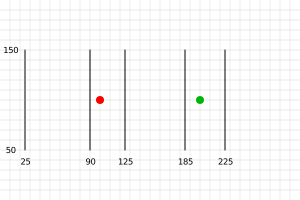
线段从左至右编号为0至4, 若代码正确执行,则检测结果应为:
- 第一个点(红色)的最近线段编号应为
1 - 第二个点(绿色)的最近线段编号应为
3
让我们将点数据存入缓冲区,并创建一个新缓冲区用于存储每个点计算得到的最近线段索引。 Lets put the points in a buffer as well as make a buffer to hold the computed closest index for each
const closestNdxBuffer = makeBuffer(gl, points.length * 4, gl.STATIC_DRAW);
const pointsBuffer = makeBuffer(gl, new Float32Array(points), gl.DYNAMIC_DRAW);
让我们创建一个纹理来存储所有线段的端点数据。
function createDataTexture(gl, data, numComponents, internalFormat, format, type) {
  const numElements = data.length / numComponents;

  // compute a size that will hold all of our data
  const width = Math.ceil(Math.sqrt(numElements));
  const height = Math.ceil(numElements / width);

  const bin = new Float32Array(width * height * numComponents);
  bin.set(data);

  const tex = gl.createTexture();
  gl.bindTexture(gl.TEXTURE_2D, tex);
  gl.texImage2D(
      gl.TEXTURE_2D,
      0,        // mip level
      internalFormat,
      width,
      height,
      0,        // border
      format,
      type,
      bin,
  );
  gl.texParameteri(gl.TEXTURE_2D, gl.TEXTURE_MIN_FILTER, gl.NEAREST);
  gl.texParameteri(gl.TEXTURE_2D, gl.TEXTURE_MAG_FILTER, gl.NEAREST);
  gl.texParameteri(gl.TEXTURE_2D, gl.TEXTURE_WRAP_S, gl.CLAMP_TO_EDGE);
  gl.texParameteri(gl.TEXTURE_2D, gl.TEXTURE_WRAP_T, gl.CLAMP_TO_EDGE);
  return {tex, dimensions: [width, height]};
}

const {tex: linesTex, dimensions: linesTexDimensions} =
    createDataTexture(gl, lines, 2, gl.RG32F, gl.RG, gl.FLOAT);
在本实现中,我们允许代码自动确定纹理尺寸并进行数据填充。 例如,若输入包含7个元素的数组,系统会将其存入3×3的纹理中。 该操作将同时返回纹理对象及其最终确定的尺寸。 之所以自动选择尺寸,是因为纹理存在最大尺寸限制。
理想情况下,我们更希望将数据视为一维数组来处理(如位置一维数组、线段端点一维数组等),因此只需声明N×1的纹理即可。但GPU存在最大尺寸限制(可能低至1024或2048)。 最大尺寸限制为1024,而我们的数组需要存储1025个值时,就必须将数据存入诸如512×2这类非方形纹理中。 通过将数据排列为方形纹理(如1024×1024),我们可将容量上限提升至最大纹理尺寸的平方值,才会触及硬件限制。 对于1024的尺寸限制,这种排列方式可支持超过100万值(1,048,576)的数组存储。
采用方形纹理布局时,只有当数据量达到最大纹理尺寸的平方时才会触及限制。 以1024的尺寸限制为例,该方案可支持超过100万(1024×1024=1,048,576)个数据值的存储。
接下来编译着色器并查找变量位置。
const closestLinePrg = createProgram(
    gl, [closestLineVS, closestLineFS], ['closestNdx']);

const closestLinePrgLocs = {
  point: gl.getAttribLocation(closestLinePrg, 'point'),
  linesTex: gl.getUniformLocation(closestLinePrg, 'linesTex'),
  numLineSegments: gl.getUniformLocation(closestLinePrg, 'numLineSegments'),
};
并创建这些点的顶点数组对象(VAO)。
function makeVertexArray(gl, bufLocPairs) {
  const va = gl.createVertexArray();
  gl.bindVertexArray(va);
  for (const [buffer, loc] of bufLocPairs) {
    gl.bindBuffer(gl.ARRAY_BUFFER, buffer);
    gl.enableVertexAttribArray(loc);
    gl.vertexAttribPointer(
        loc,      // attribute location
        2,        // number of elements
        gl.FLOAT, // type of data
        false,    // normalize
        0,        // stride (0 = auto)
        0,        // offset
    );
  }
  return va;
}

const closestLinesVA = makeVertexArray(gl, [
  [pointsBuffer, closestLinePrgLocs.point],
]);
现在我们需要设置一个transform feedback(变换反馈),以便将结果写入 cloestNdxBuffer 中。
function makeTransformFeedback(gl, buffer) {
  const tf = gl.createTransformFeedback();
  gl.bindTransformFeedback(gl.TRANSFORM_FEEDBACK, tf);
  gl.bindBufferBase(gl.TRANSFORM_FEEDBACK_BUFFER, 0, buffer);
  return tf;
}

const closestNdxTF = makeTransformFeedback(gl, closestNdxBuffer);
有了以上所有的设置,我们就可以开始渲染了。
// compute the closest lines
gl.bindVertexArray(closestLinesVA);
gl.useProgram(closestLinePrg);
gl.uniform1i(closestLinePrgLocs.linesTex, 0);
gl.uniform1i(closestLinePrgLocs.numLineSegments, numLineSegments);

// turn of using the fragment shader
gl.enable(gl.RASTERIZER_DISCARD);

gl.bindTransformFeedback(gl.TRANSFORM_FEEDBACK, closestNdxTF);
gl.beginTransformFeedback(gl.POINTS);
gl.drawArrays(gl.POINTS, 0, numPoints);
gl.endTransformFeedback();
gl.bindTransformFeedback(gl.TRANSFORM_FEEDBACK, null);

// turn on using fragment shaders again
gl.disable(gl.RASTERIZER_DISCARD);
并最终读取结果。
// get the results.
{
  const results = new Int32Array(numPoints);
  gl.bindBuffer(gl.ARRAY_BUFFER, closestNdxBuffer);
  gl.getBufferSubData(gl.ARRAY_BUFFER, 0, results);
  log(results);
}
如果我们运行它
我们应该会得到预期的结果 [1, 3]。
从 GPU 读取数据的速度很慢。假设我们想要可视化这些结果。将这些结果读取回 JavaScript 并进行绘制会相对容易,但如果不将它们读取回 JavaScript 呢?让我们直接使用这些数据并绘制结果。
首先,绘制这些点相对容易,这与粒子示例相同。 我们将每个点绘制为不同的颜色,这样就可以用相同的颜色高亮显示最近的线段。
const drawPointsVS = `#version 300 es
in vec4 point;

uniform float numPoints;
uniform mat4 matrix;

out vec4 v_color;

// converts hue, saturation, and value each in the 0 to 1 range
// to rgb.  c = color, c.x = hue, c.y = saturation, c.z = value
vec3 hsv2rgb(vec3 c) {
  c = vec3(c.x, clamp(c.yz, 0.0, 1.0));
  vec4 K = vec4(1.0, 2.0 / 3.0, 1.0 / 3.0, 3.0);
  vec3 p = abs(fract(c.xxx + K.xyz) * 6.0 - K.www);
  return c.z * mix(K.xxx, clamp(p - K.xxx, 0.0, 1.0), c.y);
}

void main() {
  gl_Position = matrix * point;
  gl_PointSize = 10.0;

  float hue = float(gl_VertexID) / numPoints;
  v_color = vec4(hsv2rgb(vec3(hue, 1, 1)), 1);
}
`;

const drawClosestLinesPointsFS = `#version 300 es
precision highp float;
in vec4 v_color;
out vec4 outColor;
void main() {
  outColor = v_color;
}`;
不传入颜色,而是使用 hsv2rgb 生成颜色,并传入一个从 0 到 1 的色相值。
对于 500 个点来说,可能很难区分各条线,但对于大约 10 个点,我们应该能够分辨清楚。
将生成的颜色传递给一个简单的片元着色器。
const drawClosestPointsLinesFS = `
precision highp float;
varying vec4 v_color;
void main() {
  gl_FragColor = v_color;
}
`;
要绘制所有的线段,即使是那些不靠近任何点的线段,做法几乎是一样的,只不过我们不再生成颜色。
在这种情况下,我们只是使用一个硬编码的颜色。
const drawLinesVS = `#version 300 es
uniform sampler2D linesTex;
uniform mat4 matrix;

out vec4 v_color;

vec4 getAs1D(sampler2D tex, ivec2 dimensions, int index) {
  int y = index / dimensions.x;
  int x = index % dimensions.x;
  return texelFetch(tex, ivec2(x, y), 0);
}

void main() {
  ivec2 linesTexDimensions = textureSize(linesTex, 0);

  // pull the position from the texture
  vec4 position = getAs1D(linesTex, linesTexDimensions, gl_VertexID);

  // do the common matrix math
  gl_Position = matrix * vec4(position.xy, 0, 1);

  // just so we can use the same fragment shader
  v_color = vec4(0.8, 0.8, 0.8, 1);
}
`;
我们没有使用任何属性,而是像我们在无数据绘制 中提到的那样,直接使用 gl_VertexID。
最终,绘制最近线条的功能实现如下。
const drawClosestLinesVS = `#version 300 es
in int closestNdx;
uniform float numPoints;
uniform sampler2D linesTex;
uniform mat4 matrix;

out vec4 v_color;

vec4 getAs1D(sampler2D tex, ivec2 dimensions, int index) {
  int y = index / dimensions.x;
  int x = index % dimensions.x;
  return texelFetch(tex, ivec2(x, y), 0);
}

// converts hue, saturation, and value each in the 0 to 1 range
// to rgb.  c = color, c.x = hue, c.y = saturation, c.z = value
vec3 hsv2rgb(vec3 c) {
  c = vec3(c.x, clamp(c.yz, 0.0, 1.0));
  vec4 K = vec4(1.0, 2.0 / 3.0, 1.0 / 3.0, 3.0);
  vec3 p = abs(fract(c.xxx + K.xyz) * 6.0 - K.www);
  return c.z * mix(K.xxx, clamp(p - K.xxx, 0.0, 1.0), c.y);
}

void main() {
  ivec2 linesTexDimensions = textureSize(linesTex, 0);

  // pull the position from the texture
  int linePointId = closestNdx * 2 + gl_VertexID % 2;
  vec4 position = getAs1D(linesTex, linesTexDimensions, linePointId);

  // do the common matrix math
  gl_Position = matrix * vec4(position.xy, 0, 1);

  int pointId = gl_InstanceID;
  float hue = float(pointId) / numPoints;
  v_color = vec4(hsv2rgb(vec3(hue, 1, 1)), 1);
}
`;
我们将 closestNdx 作为一个属性传入,它们是我们之前生成的结果。
利用它我们可以查找特定的线段。但由于每条线段需要绘制两个点,
我们将使用 实例化绘制 来为每个 closestNdx 绘制两个点。
然后我们可以使用 gl_VertexID % 2 来选择线段的起点或终点。
最后,我们使用与绘制点时相同的方法来计算颜色,这样线段的颜色就会与对应的点匹配。
我们需要编译所有这些新的着色器程序,并查找它们的变量位置。
const closestLinePrg = createProgram(
    gl, [closestLineVS, closestLineFS], ['closestNdx']);
+const drawLinesPrg = createProgram(
+    gl, [drawLinesVS, drawClosestLinesPointsFS]);
+const drawClosestLinesPrg = createProgram(
+    gl, [drawClosestLinesVS, drawClosestLinesPointsFS]);
+const drawPointsPrg = createProgram(
+    gl, [drawPointsVS, drawClosestLinesPointsFS]);

const closestLinePrgLocs = {
  point: gl.getAttribLocation(closestLinePrg, 'point'),
  linesTex: gl.getUniformLocation(closestLinePrg, 'linesTex'),
  numLineSegments: gl.getUniformLocation(closestLinePrg, 'numLineSegments'),
};
+const drawLinesPrgLocs = {
+  linesTex: gl.getUniformLocation(drawLinesPrg, 'linesTex'),
+  matrix: gl.getUniformLocation(drawLinesPrg, 'matrix'),
+};
+const drawClosestLinesPrgLocs = {
+  closestNdx: gl.getAttribLocation(drawClosestLinesPrg, 'closestNdx'),
+  linesTex: gl.getUniformLocation(drawClosestLinesPrg, 'linesTex'),
+  matrix: gl.getUniformLocation(drawClosestLinesPrg, 'matrix'),
+  numPoints: gl.getUniformLocation(drawClosestLinesPrg, 'numPoints'),
+};
+const drawPointsPrgLocs = {
+  point: gl.getAttribLocation(drawPointsPrg, 'point'),
+  matrix: gl.getUniformLocation(drawPointsPrg, 'matrix'),
+  numPoints: gl.getUniformLocation(drawPointsPrg, 'numPoints'),
+};
我们需要为绘制点和最近的线段分别创建顶点数组对象(vertex arrays)。
const closestLinesVA = makeVertexArray(gl, [
  [pointsBuffer, closestLinePrgLocs.point],
]);

+const drawClosestLinesVA = gl.createVertexArray();
+gl.bindVertexArray(drawClosestLinesVA);
+gl.bindBuffer(gl.ARRAY_BUFFER, closestNdxBuffer);
+gl.enableVertexAttribArray(drawClosestLinesPrgLocs.closestNdx);
+gl.vertexAttribIPointer(drawClosestLinesPrgLocs.closestNdx, 1, gl.INT, 0, 0);
+gl.vertexAttribDivisor(drawClosestLinesPrgLocs.closestNdx, 1);
+
+const drawPointsVA = makeVertexArray(gl, [
+  [pointsBuffer, drawPointsPrgLocs.point],
+]);
因此,在渲染时,我们像之前一样计算结果,但我们不再使用 getBufferSubData 来读取结果,而是将结果直接传递给相应的着色器。
首先,我们用灰色绘制所有的线段。
// draw all the lines in gray
gl.bindFramebuffer(gl.FRAMEBUFFER, null);
gl.viewport(0, 0, gl.canvas.width, gl.canvas.height);

gl.bindVertexArray(null);
gl.useProgram(drawLinesPrg);

// bind the lines texture to texture unit 0
gl.activeTexture(gl.TEXTURE0);
gl.bindTexture(gl.TEXTURE_2D, linesTex);

// Tell the shader to use texture on texture unit 0
gl.uniform1i(drawLinesPrgLocs.linesTex, 0);
gl.uniformMatrix4fv(drawLinesPrgLocs.matrix, false, matrix);

gl.drawArrays(gl.LINES, 0, numLineSegments * 2);
然后,我们绘制所有最近的线段。
gl.bindVertexArray(drawClosestLinesVA);
gl.useProgram(drawClosestLinesPrg);

gl.activeTexture(gl.TEXTURE0);
gl.bindTexture(gl.TEXTURE_2D, linesTex);

gl.uniform1i(drawClosestLinesPrgLocs.linesTex, 0);
gl.uniform1f(drawClosestLinesPrgLocs.numPoints, numPoints);
gl.uniformMatrix4fv(drawClosestLinesPrgLocs.matrix, false, matrix);

gl.drawArraysInstanced(gl.LINES, 0, 2, numPoints);
最后,我们绘制每一个点。
gl.bindVertexArray(drawPointsVA);
gl.useProgram(drawPointsPrg);

gl.uniform1f(drawPointsPrgLocs.numPoints, numPoints);
gl.uniformMatrix4fv(drawPointsPrgLocs.matrix, false, matrix);

gl.drawArrays(gl.POINTS, 0, numPoints);
在运行之前,我们再做一件事:添加更多的点和线段。
-const points = [
-  100, 100,
-  200, 100,
-];
-const lines = [
-   25,  50,
-   25, 150,
-   90,  50,
-   90, 150,
-  125,  50,
-  125, 150,
-  185,  50,
-  185, 150,
-  225,  50,
-  225, 150,
-];

+function createPoints(numPoints, ranges) {
+  const points = [];
+  for (let i = 0; i < numPoints; ++i) {
+    points.push(...ranges.map(range => r(...range)));
+  }
+  return points;
+}
+
+const r = (min, max) => min + Math.random() * (max - min);
+
+const points = createPoints(8, [[0, gl.canvas.width], [0, gl.canvas.height]]);
+const lines = createPoints(125 * 2, [[0, gl.canvas.width], [0, gl.canvas.height]]);
const numPoints = points.length / 2;
const numLineSegments = lines.length / 2 / 2;
如果我们运行它。
你可以增加点和线段的数量,
但到某个程度后,就无法分辨哪些点对应哪些线段了。
不过在数量较少的情况下,至少可以通过视觉验证它是否正常工作。
为了好玩,我们来把粒子示例和这个示例结合起来。
我们将使用在粒子示例中用于更新粒子位置的技术来更新这些点的位置。
至于线段的端点更新,我们会像开头那样,把结果写入到纹理中。
为此,我们复制粒子示例中的 updatePositionFS 顶点着色器。
而对于线段,由于它们的值是存储在纹理中的,
所以我们需要在片元着色器中移动它们的点。
const updateLinesVS = `#version 300 es
in vec4 position;
void main() {
  gl_Position = position;
}
`;

const updateLinesFS = `#version 300 es
precision highp float;

uniform sampler2D linesTex;
uniform sampler2D velocityTex;
uniform vec2 canvasDimensions;
uniform float deltaTime;

out vec4 outColor;

vec2 euclideanModulo(vec2 n, vec2 m) {
	return mod(mod(n, m) + m, m);
}

void main() {
  // compute texel coord from gl_FragCoord;
  ivec2 texelCoord = ivec2(gl_FragCoord.xy);

  vec2 position = texelFetch(linesTex, texelCoord, 0).xy;
  vec2 velocity = texelFetch(velocityTex, texelCoord, 0).xy;
  vec2 newPosition = euclideanModulo(position + velocity * deltaTime, canvasDimensions);

  outColor = vec4(newPosition, 0, 1);
}
`;
接着,我们可以编译用于更新点和线段的两个新着色器,并查找它们的变量位置。
+const updatePositionPrg = createProgram(
+    gl, [updatePositionVS, updatePositionFS], ['newPosition']);
+const updateLinesPrg = createProgram(
+    gl, [updateLinesVS, updateLinesFS]);
const closestLinePrg = createProgram(
    gl, [closestLineVS, closestLineFS], ['closestNdx']);
const drawLinesPrg = createProgram(
    gl, [drawLinesVS, drawClosestLinesPointsFS]);
const drawClosestLinesPrg = createProgram(
    gl, [drawClosestLinesVS, drawClosestLinesPointsFS]);
const drawPointsPrg = createProgram(
    gl, [drawPointsVS, drawClosestLinesPointsFS]);

+const updatePositionPrgLocs = {
+  oldPosition: gl.getAttribLocation(updatePositionPrg, 'oldPosition'),
+  velocity: gl.getAttribLocation(updatePositionPrg, 'velocity'),
+  canvasDimensions: gl.getUniformLocation(updatePositionPrg, 'canvasDimensions'),
+  deltaTime: gl.getUniformLocation(updatePositionPrg, 'deltaTime'),
+};
+const updateLinesPrgLocs = {
+  position: gl.getAttribLocation(updateLinesPrg, 'position'),
+  linesTex: gl.getUniformLocation(updateLinesPrg, 'linesTex'),
+  velocityTex: gl.getUniformLocation(updateLinesPrg, 'velocityTex'),
+  canvasDimensions: gl.getUniformLocation(updateLinesPrg, 'canvasDimensions'),
+  deltaTime: gl.getUniformLocation(updateLinesPrg, 'deltaTime'),
+};
const closestLinePrgLocs = {
  point: gl.getAttribLocation(closestLinePrg, 'point'),
  linesTex: gl.getUniformLocation(closestLinePrg, 'linesTex'),
  numLineSegments: gl.getUniformLocation(closestLinePrg, 'numLineSegments'),
};
const drawLinesPrgLocs = {
  linesTex: gl.getUniformLocation(drawLinesPrg, 'linesTex'),
  matrix: gl.getUniformLocation(drawLinesPrg, 'matrix'),
};
const drawClosestLinesPrgLocs = {
  closestNdx: gl.getAttribLocation(drawClosestLinesPrg, 'closestNdx'),
  linesTex: gl.getUniformLocation(drawClosestLinesPrg, 'linesTex'),
  matrix: gl.getUniformLocation(drawClosestLinesPrg, 'matrix'),
  numPoints: gl.getUniformLocation(drawClosestLinesPrg, 'numPoints'),
};
const drawPointsPrgLocs = {
  point: gl.getAttribLocation(drawPointsPrg, 'point'),
  matrix: gl.getUniformLocation(drawPointsPrg, 'matrix'),
  numPoints: gl.getUniformLocation(drawPointsPrg, 'numPoints'),
};
我们需要为点和线段都生成速度。
const points = createPoints(8, [[0, gl.canvas.width], [0, gl.canvas.height]]);
const lines = createPoints(125 * 2, [[0, gl.canvas.width], [0, gl.canvas.height]]);
const numPoints = points.length / 2;
const numLineSegments = lines.length / 2 / 2;

+const pointVelocities = createPoints(numPoints, [[-20, 20], [-20, 20]]);
+const lineVelocities = createPoints(numLineSegments * 2, [[-20, 20], [-20, 20]]);
我们需要为点创建两个缓冲区,以便像上面处理粒子那样进行交换。
同时也需要一个缓冲区来存储点的速度。
此外,还需要一个从 -1 到 +1 的裁剪空间四边形(quad),用于更新线段的位置。
const closestNdxBuffer = makeBuffer(gl, points.length * 4, gl.STATIC_DRAW);
-const pointsBuffer = makeBuffer(gl, new Float32Array(points), gl.STATIC_DRAW);
+const pointsBuffer1 = makeBuffer(gl, new Float32Array(points), gl.DYNAMIC_DRAW);
+const pointsBuffer2 = makeBuffer(gl, new Float32Array(points), gl.DYNAMIC_DRAW);
+const pointVelocitiesBuffer = makeBuffer(gl, new Float32Array(pointVelocities), gl.STATIC_DRAW);
+const quadBuffer = makeBuffer(gl, new Float32Array([
+  -1, -1,
+   1, -1,
+  -1,  1,
+  -1,  1,
+   1, -1,
+   1,  1,
+]), gl.STATIC_DRAW);
同样地,我们现在需要两个纹理来存储线段的端点,
通过相互更新并进行交换。
此外,我们还需要一个纹理来存储线段端点的速度。
-const {tex: linesTex, dimensions: linesTexDimensions} =
-    createDataTexture(gl, lines, 2, gl.RG32F, gl.RG, gl.FLOAT);
+const {tex: linesTex1, dimensions: linesTexDimensions1} =
+    createDataTexture(gl, lines, 2, gl.RG32F, gl.RG, gl.FLOAT);
+const {tex: linesTex2, dimensions: linesTexDimensions2} =
+    createDataTexture(gl, lines, 2, gl.RG32F, gl.RG, gl.FLOAT);
+const {tex: lineVelocitiesTex, dimensions: lineVelocitiesTexDimensions} =
+    createDataTexture(gl, lineVelocities, 2, gl.RG32F, gl.RG, gl.FLOAT);
我们需要创建多个顶点数组对象(vertex arrays):
-
2 个用于更新位置:
一个使用pointsBuffer1作为输入,另一个使用pointsBuffer2作为输入。 -
1 个用于更新线段时使用的裁剪空间(-1 到 +1)四边形。
-
2 个用于计算最近线段:
一个读取pointsBuffer1中的点,另一个读取pointsBuffer2中的点。 -
2 个用于绘制点:
一个读取pointsBuffer1中的点,另一个读取pointsBuffer2中的点。
+const updatePositionVA1 = makeVertexArray(gl, [
+  [pointsBuffer1, updatePositionPrgLocs.oldPosition],
+  [pointVelocitiesBuffer, updatePositionPrgLocs.velocity],
+]);
+const updatePositionVA2 = makeVertexArray(gl, [
+  [pointsBuffer2, updatePositionPrgLocs.oldPosition],
+  [pointVelocitiesBuffer, updatePositionPrgLocs.velocity],
+]);
+
+const updateLinesVA = makeVertexArray(gl, [
+  [quadBuffer, updateLinesPrgLocs.position],
+]);

-const closestLinesVA = makeVertexArray(gl, [
-  [pointsBuffer, closestLinePrgLocs.point],
-]);
+const closestLinesVA1 = makeVertexArray(gl, [
+  [pointsBuffer1, closestLinePrgLocs.point],
+]);
+const closestLinesVA2 = makeVertexArray(gl, [
+  [pointsBuffer2, closestLinePrgLocs.point],
+]);

const drawClosestLinesVA = gl.createVertexArray();
gl.bindVertexArray(drawClosestLinesVA);
gl.bindBuffer(gl.ARRAY_BUFFER, closestNdxBuffer);
gl.enableVertexAttribArray(drawClosestLinesPrgLocs.closestNdx);
gl.vertexAttribIPointer(drawClosestLinesPrgLocs.closestNdx, 1, gl.INT, 0, 0);
gl.vertexAttribDivisor(drawClosestLinesPrgLocs.closestNdx, 1);

-const drawPointsVA = makeVertexArray(gl, [
-  [pointsBuffer, drawPointsPrgLocs.point],
-]);
+const drawPointsVA1 = makeVertexArray(gl, [
+  [pointsBuffer1, drawPointsPrgLocs.point],
+]);
+const drawPointsVA2 = makeVertexArray(gl, [
+  [pointsBuffer2, drawPointsPrgLocs.point],
+]);
我们还需要另外 2 个 Transform Feedback 对象,用于更新点的位置。
function makeTransformFeedback(gl, buffer) {
  const tf = gl.createTransformFeedback();
  gl.bindTransformFeedback(gl.TRANSFORM_FEEDBACK, tf);
  gl.bindBufferBase(gl.TRANSFORM_FEEDBACK_BUFFER, 0, buffer);
  return tf;
}

+const pointsTF1 = makeTransformFeedback(gl, pointsBuffer1);
+const pointsTF2 = makeTransformFeedback(gl, pointsBuffer2);

const closestNdxTF = makeTransformFeedback(gl, closestNdxBuffer);
我们需要创建帧缓冲对象(framebuffers)用于更新线段端点:
一个用于写入 linesTex1,另一个用于写入 linesTex2。
function createFramebuffer(gl, tex) {
  const fb = gl.createFramebuffer();
  gl.bindFramebuffer(gl.FRAMEBUFFER, fb);
  gl.framebufferTexture2D(gl.FRAMEBUFFER, gl.COLOR_ATTACHMENT0, gl.TEXTURE_2D, tex, 0);
  return fb;
}

const linesFB1 = createFramebuffer(gl, linesTex1);
const linesFB2 = createFramebuffer(gl, linesTex2);
由于我们希望写入浮点纹理,而这在 WebGL2 中是一个可选特性,
因此我们需要通过检查 EXT_color_buffer_float 扩展是否可用来确认是否支持。
// Get A WebGL context
/** @type {HTMLCanvasElement} */
const canvas = document.querySelector("#canvas");
const gl = canvas.getContext("webgl2");
if (!gl) {
  return;
}
+const ext = gl.getExtension('EXT_color_buffer_float');
+if (!ext) {
+  alert('need EXT_color_buffer_float');
+  return;
+}
我们还需要设置一些对象来跟踪当前帧和下一帧的状态,
这样每一帧我们就可以轻松地交换所需的资源。
let current = {
  // for updating points
  updatePositionVA: updatePositionVA1,  // read from points1
  pointsTF: pointsTF2,                  // write to points2
  // for updating line endings
  linesTex: linesTex1,                  // read from linesTex1
  linesFB: linesFB2,                    // write to linesTex2
  // for computing closest lines
  closestLinesVA: closestLinesVA2,      // read from points2
  // for drawing all lines and closest lines
  allLinesTex: linesTex2,               // read from linesTex2
  // for drawing points
  drawPointsVA: drawPointsVA2,          // read form points2
};

let next = {
  // for updating points
  updatePositionVA: updatePositionVA2,  // read from points2
  pointsTF: pointsTF1,                  // write to points1
  // for updating line endings
  linesTex: linesTex2,                  // read from linesTex2
  linesFB: linesFB1,                    // write to linesTex1
  // for computing closest lines
  closestLinesVA: closestLinesVA1,      // read from points1
  // for drawing all lines and closest lines
  allLinesTex: linesTex1,               // read from linesTex1
  // for drawing points
  drawPointsVA: drawPointsVA1,          // read form points1
};
然后我们需要一个渲染循环。
我们将所有的部分拆分成多个函数来组织。
let then = 0;
function render(time) {
  // convert to seconds
  time *= 0.001;
  // Subtract the previous time from the current time
  const deltaTime = time - then;
  // Remember the current time for the next frame.
  then = time;

  webglUtils.resizeCanvasToDisplaySize(gl.canvas);

  gl.clear(gl.COLOR_BUFFER_BIT);

  updatePointPositions(deltaTime);
  updateLineEndPoints(deltaTime);
  computeClosestLines();

  const matrix = m4.orthographic(0, gl.canvas.width, 0, gl.canvas.height, -1, 1);

  drawAllLines(matrix);
  drawClosestLines(matrix);
  drawPoints(matrix);

  // swap
  {
    const temp = current;
    current = next;
    next = temp;
  }

  requestAnimationFrame(render);
}
requestAnimationFrame(render);
}
现在我们只需要填充各个部分即可。
之前的所有部分保持不变,只是在适当的位置引用 current。
function computeClosestLines() {
-  gl.bindVertexArray(closestLinesVA);
+  gl.bindVertexArray(current.closestLinesVA);
  gl.useProgram(closestLinePrg);

  gl.activeTexture(gl.TEXTURE0);
-  gl.bindTexture(gl.TEXTURE_2D, linesTex);
+  gl.bindTexture(gl.TEXTURE_2D, current.linesTex);

  gl.uniform1i(closestLinePrgLocs.linesTex, 0);
  gl.uniform1i(closestLinePrgLocs.numLineSegments, numLineSegments);

  drawArraysWithTransformFeedback(gl, closestNdxTF, gl.POINTS, numPoints);
}

function drawAllLines(matrix) {
  gl.bindFramebuffer(gl.FRAMEBUFFER, null);
  gl.viewport(0, 0, gl.canvas.width, gl.canvas.height);

  gl.bindVertexArray(null);
  gl.useProgram(drawLinesPrg);

  // bind the lines texture to texture unit 0
  gl.activeTexture(gl.TEXTURE0);
-  gl.bindTexture(gl.TEXTURE_2D, linesTex);
+  gl.bindTexture(gl.TEXTURE_2D, current.allLinesTex);

  // Tell the shader to use texture on texture unit 0
  gl.uniform1i(drawLinesPrgLocs.linesTex, 0);
  gl.uniformMatrix4fv(drawLinesPrgLocs.matrix, false, matrix);

  gl.drawArrays(gl.LINES, 0, numLineSegments * 2);
}

function drawClosestLines(matrix) {
  gl.bindVertexArray(drawClosestLinesVA);
  gl.useProgram(drawClosestLinesPrg);

  gl.activeTexture(gl.TEXTURE0);
-  gl.bindTexture(gl.TEXTURE_2D, linesTex);
+  gl.bindTexture(gl.TEXTURE_2D, current.allLinesTex);

  gl.uniform1i(drawClosestLinesPrgLocs.linesTex, 0);
  gl.uniform1f(drawClosestLinesPrgLocs.numPoints, numPoints);
  gl.uniformMatrix4fv(drawClosestLinesPrgLocs.matrix, false, matrix);

  gl.drawArraysInstanced(gl.LINES, 0, 2, numPoints);
}

function drawPoints(matrix) {
-  gl.bindVertexArray(drawPointsVA);
+  gl.bindVertexArray(current.drawPointsVA);
  gl.useProgram(drawPointsPrg);

  gl.uniform1f(drawPointsPrgLocs.numPoints, numPoints);
  gl.uniformMatrix4fv(drawPointsPrgLocs.matrix, false, matrix);

  gl.drawArrays(gl.POINTS, 0, numPoints);
}
我们还需要两个新函数,分别用于更新点和线段。
function updatePointPositions(deltaTime) {
  gl.bindVertexArray(current.updatePositionVA);
  gl.useProgram(updatePositionPrg);
  gl.uniform1f(updatePositionPrgLocs.deltaTime, deltaTime);
  gl.uniform2f(updatePositionPrgLocs.canvasDimensions, gl.canvas.width, gl.canvas.height);
  drawArraysWithTransformFeedback(gl, current.pointsTF, gl.POINTS, numPoints);
}

function updateLineEndPoints(deltaTime) {
  // Update the line endpoint positions ---------------------
  gl.bindVertexArray(updateLinesVA); // just a quad
  gl.useProgram(updateLinesPrg);

  // bind texture to texture units 0 and 1
  gl.activeTexture(gl.TEXTURE0);
  gl.bindTexture(gl.TEXTURE_2D, current.linesTex);
  gl.activeTexture(gl.TEXTURE0 + 1);
  gl.bindTexture(gl.TEXTURE_2D, lineVelocitiesTex);

  // tell the shader to look at the textures on texture units 0 and 1
  gl.uniform1i(updateLinesPrgLocs.linesTex, 0);
  gl.uniform1i(updateLinesPrgLocs.velocityTex, 1);
  gl.uniform1f(updateLinesPrgLocs.deltaTime, deltaTime);
  gl.uniform2f(updateLinesPrgLocs.canvasDimensions, gl.canvas.width, gl.canvas.height);

  // write to the other lines texture
  gl.bindFramebuffer(gl.FRAMEBUFFER, current.linesFB);
  gl.viewport(0, 0, ...lineVelocitiesTexDimensions);

  // drawing a clip space -1 to +1 quad = map over entire destination array
  gl.drawArrays(gl.TRIANGLES, 0, 6);
}
至此,我们就可以看到它动态运行了,所有的计算都在 GPU 上完成。
一些关于 GPGPU 的注意事项
-
在 WebGL1 中,GPGPU 基本上仅限于使用二维数组(纹理)作为输出。
WebGL2 增加了使用 Transform Feedback 来处理任意大小的一维数组的能力。如果你感兴趣,可以查看 同一主题的 WebGL1 版本文章,
看看如何仅使用输出到纹理的方式完成这一切。
当然,稍加思考其实也很容易理解其原理。WebGL2 中也有使用纹理而非 Transform Feedback 的版本。因为使用
texelFetch并具备更多的纹理格式选择,会让实现方式有所不同。 -
GPU 的精度与 CPU 并不相同。
请检查你的结果,确保它们在可接受的范围内。
-
GPGPU 存在一定的开销。
在上面的前几个示例中,我们使用 WebGL 计算了一些数据然后读取结果。
设置缓冲区和纹理、配置属性和 uniform 都需要时间。
这些操作的开销足以让一些规模较小的任务更适合直接用 JavaScript 完成。 比如那些将 6 个数相乘或对 3 对数字求和的示例,数据量太小,使用 GPGPU 根本得不偿失。 到底在哪个规模点 GPGPU 才值得使用,这个临界值并不明确。你可以自行尝试。但可以大致估计,如果你处理的对象少于 1000 个,那就还是用 JavaScript 更合适。 -
readPixels和getBufferSubData的速度很慢。从 WebGL 读取结果是很慢的操作,因此尽可能避免读取是非常重要的。
例如,上面的粒子系统和动态最近线段的示例都从未将结果读取回 JavaScript。
只要有可能,就尽量让结果保留在 GPU 上。 换句话说,你可以这样做:- 在 GPU 上计算内容
- 读取结果
- 为下一步准备结果
- 将准备好的结果上传到 GPU
- 在 GPU 上继续计算
- 读取结果
- 为下一步准备结果
- 将准备好的结果上传到 GPU
- 在 GPU 上继续计算
- 读取结果
而如果通过一些巧妙的设计,效率会高得多,比如:
- 在 GPU 上计算内容
- 使用 GPU 为下一步准备结果
- 在 GPU 上继续计算
- 使用 GPU 为下一步准备结果
- 在 GPU 上继续计算
- 最后再读取结果
我们的动态最近线段示例就是这样做的:结果从未离开 GPU。
再举一个例子:我曾经写过一个计算直方图的着色器,最初我是将结果读取回 JavaScript,计算出最小值和最大值,然后再使用这些最小值和最大值作为 uniform 参数,把图像绘制回 canvas,实现图像自动拉伸(auto-level)。
但后来我发现,与其将直方图读取回 JavaScript,
不如直接在 GPU 上运行一个着色器,让它对直方图纹理进行处理,
输出一个 2 像素的纹理,分别存储最小值和最大值。然后我可以将这张 2 像素的纹理传入第三个着色器,
让它在 GPU 内部读取最小值和最大值来做图像处理,
无需再从 GPU 中读取数据来设置 uniform。类似地,为了显示直方图本身,
起初我也是从 GPU 读取直方图数据,
但后来我改为编写一个着色器,直接在 GPU 上可视化直方图,
完全不需要将数据读取回 JavaScript。通过这种方式,整个处理流程都保持在 GPU 上进行,
性能更高,效率更好。 -
GPU能够并行处理许多任务,但大多数无法像CPU那样进行多任务处理。GPU通常无法实现"抢占式多任务处理"。这意味着如果你运行一个非常复杂的着色器,比如需要5分钟才能完成,它可能会导致你的整个机器冻结5分钟。 大多数完善的操作系统会通过CPU检查自上次向GPU发送命令后经过的时间来处理这个问题。如果时间过长(5-6秒)且GPU没有响应,它们唯一的选择就是重置GPU。
这也是WebGL可能会丢失上下文并出现"Aw,rats!"或类似消息的原因之一。
虽然很容易让GPU超负荷工作,但在图形处理中,通常不会达到5-6秒的程度。更多是0.1秒级别的情况,这虽然也不理想,但通常我们希望图形能快速运行,因此程序员应该会进行优化或采用其他技术来保持应用程序的响应性。
另一方面,在GPGPU计算中,你可能确实需要让GPU运行繁重任务。这里没有简单的解决方案。手机的GPU性能远低于高端PC。除了自己进行计时外,没有确切的方法知道在GPU变得"太慢"之前可以给它分配多少工作量。
我没有现成的解决方案可以提供。只是提醒一下,根据你要实现的功能,可能会遇到这个问题。
-
移动设备通常不支持渲染到浮点纹理。
有几种方法可以解决这个问题。其中一种是使用GLSL函数:
floatBitsToInt、floatBitsToUint、intBitsToFloat和uintBitsToFloat。例如,基于纹理的粒子示例需要写入浮点纹理。我们可以通过将纹理声明为
RG32I类型(32位整数纹理)但仍上传浮点数数据来解决这个问题。在着色器中,我们需要将纹理作为整数读取,将其解码为浮点数,然后将结果重新编码为整数。例如:
#version 300 es
precision highp float;

-uniform highp sampler2D positionTex;
-uniform highp sampler2D velocityTex;
+uniform highp isampler2D positionTex;
+uniform highp isampler2D velocityTex;
uniform vec2 canvasDimensions;
uniform float deltaTime;

out ivec4 outColor;

vec2 euclideanModulo(vec2 n, vec2 m) {
	return mod(mod(n, m) + m, m);
}

void main() {
  // there will be one velocity per position
  // so the velocity texture and position texture
  // are the same size.

  // further, we're generating new positions
  // so we know our destination is the same size
  // as our source

  // compute texcoord from gl_FragCoord;
  ivec2 texelCoord = ivec2(gl_FragCoord.xy);

-  vec2 position = texelFetch(positionTex, texelCoord, 0).xy;
-  vec2 velocity = texelFetch(velocityTex, texelCoord, 0).xy;
+  vec2 position = intBitsToFloat(texelFetch(positionTex, texelCoord, 0).xy);
+  vec2 velocity = intBitsToFloat(texelFetch(velocityTex, texelCoord, 0).xy);
  vec2 newPosition = euclideanModulo(position + velocity * deltaTime, canvasDimensions);

-  outColor = vec4(newPosition, 0, 1);
+  outColor = ivec4(floatBitsToInt(newPosition), 0, 1);
}
希望这些示例能帮助您理解WebGL中GPGPU的核心概念——关键在于WebGL读写的是数据数组,而非像素。
着色器的工作机制类似于map函数——每个被调用的处理函数并不能决定其返回值的存储位置,这个决策完全由外部控制。在WebGL中,这个控制权取决于您配置的绘制方式。当调用gl.drawXXX时,系统会为每个需要计算的值调用着色器,询问"这个位置应该生成什么值?"
整个过程就是如此简单直接。
既然我们已经用GPGPU创建了一些粒子,这个精彩的视频后半段使用计算着色器实现了"粘液"模拟。
运用上述技术,这里有一个WebGL2的实现版本。